
Encountering the frustrating message “iptv smarters failed to authorize” can disrupt your streaming experience. This common issue often leaves users searching for solutions to get their favorite content back. Fortunately, most of the time, this iptv smarters error is resolvable with a few straightforward troubleshooting steps. This comprehensive guide will walk you through diagnosing and fixing authorization failures in IPTV Smarters, ensuring you can get back to enjoying your IPTV service without interruption.
The “failed to authorize” message typically indicates a problem with your IPTV Smarters app communicating with your provider’s servers or a configuration issue on your end. It could stem from incorrect login credentials, expired subscriptions, server-side problems, or even issues with the app itself. We’ll delve into each potential cause and provide actionable solutions.

Understanding the “iptv smarters failed to authorize” Message
Before diving into fixes, it’s crucial to understand what the “iptv smarters failed to authorize” error signifies. This message is a security protocol that prevents unauthorized access to your IPTV subscription. When you see this, it means the application, IPTV Smarters, has attempted to connect to your IPTV provider’s server using the credentials you’ve entered, but the server has rejected the request. This rejection can happen for a variety of reasons, and pinpointing the exact cause is the first step towards resolving the iptv smarters authorization failed issue.
Common reasons for authorization failure include:
- Incorrect Login Credentials: Double-checking your username, password, and Xtream Codes API URL is paramount. A single typo can lead to this error.
- Expired Subscription: If your IPTV subscription has run out, your provider will revoke authorization.
- Server-Side Issues: Your IPTV provider’s servers might be down for maintenance or experiencing technical difficulties.
- Geographic Restrictions: Some providers may block access from certain regions.
- Device Limits: Your provider might limit the number of simultaneous connections from a single account.
- App Glitches: Occasionally, the IPTV Smarters app itself can encounter temporary bugs.
Understanding these possibilities will help you navigate the troubleshooting process more efficiently. We will explore each of these in detail and provide step-by-step solutions.
Troubleshooting Common “iptv smarters error” Scenarios
When faced with an iptv smarters error, a systematic approach to troubleshooting is key. Many users experience the “failed to authorize” message due to simple oversights or common technical hiccups. Let’s break down the most frequent culprits and how to address them.
1. Verifying Your IPTV Smarters Credentials and Subscription Status
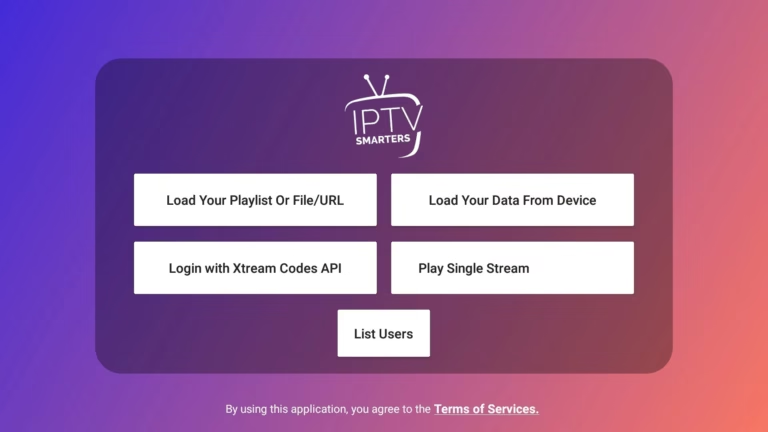
The most frequent cause of the “iptv smarters failed to authorize” error is incorrect login information. Your IPTV provider typically uses an Xtream Codes API, which requires a username, password, and a specific URL. Even a single misplaced character can result in an authorization failure. It’s essential to be absolutely sure you are entering the correct details.
- Username and Password: Carefully re-enter your username and password. Many users make the mistake of mixing up similar-looking characters (e.g., ‘l’ and ‘1’, ‘O’ and ‘0’).
- Xtream Codes API URL: This URL is crucial for connecting to your provider’s servers. Ensure there are no typos, extra spaces, or missing parts of the URL. If you’re unsure, contact your IPTV provider for the correct URL.
- Check Your Subscription: Have you recently renewed your subscription? If your subscription has expired, your provider will no longer authorize your access. Log in to your provider’s website or contact their support to confirm your subscription is active and paid for. A lapse in payment is a very common reason for the iptv smarters login error.
Actionable Steps:
- Open IPTV Smarters.
- Navigate to the “Add User” or “Login” section.
- Select “Xtream Codes API”.
- Meticulously re-type your username, password, and Xtream Codes API URL.
- Tap “Add User” or “Login” and observe the result.
If you’ve confirmed your credentials are correct and your subscription is active, but the “iptv smarters failed to authorize” message persists, move on to the next troubleshooting steps.
2. Addressing Network Connectivity and Device Issues
A stable internet connection is fundamental for any IPTV service. Network issues can manifest in various ways, including the dreaded “iptv smarters failed to authorize” error. It’s not always about your login details; sometimes, the problem lies with how your device is connecting to the internet or with the device itself.
- Internet Connection Stability: Ensure your Wi-Fi or Ethernet connection is strong and stable. Perform a speed test to verify your internet speed meets the requirements for streaming. Slow or intermittent internet can cause connection timeouts, which might be interpreted as an authorization failure. Visit Speedtest.net to check your internet speed.
- Router/Modem Reboot: A simple reboot of your router and modem can resolve many network-related glitches. Turn them off, wait for about 30 seconds, and then turn them back on.
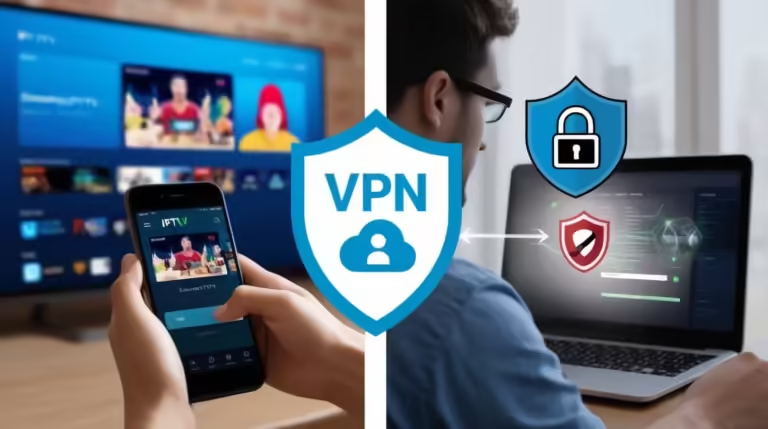
- VPN Interference: If you are using a Virtual Private Network (VPN), it might be interfering with IPTV Smarters’ ability to connect to your provider’s servers. Some IPTV providers block VPN connections to prevent abuse or geo-restriction bypass. Try disabling your VPN and attempting to authorize again. If this resolves the iptv smarters connection error, you may need to configure your VPN or find a provider that allows VPN use.
- Device Restart: Restarting the device on which you are running IPTV Smarters (e.g., Android box, Fire TV Stick, smartphone, PC) can clear temporary system glitches that might be affecting the app’s performance.
- Firewall or Antivirus: On PC or some smart devices, firewalls or antivirus software could be blocking the connection. Temporarily disable them to see if this resolves the iptv smarters authentication error. Remember to re-enable them afterwards.
Actionable Steps:
- Check your internet connection speed and stability.
- Power cycle your router and modem.
- Temporarily disable any VPN services you are using.
- Restart the device running IPTV Smarters.
- If applicable, temporarily disable firewall/antivirus software.
These steps are crucial for ensuring your device and network are not the cause of the “iptv smarters failed to authorize” problem.
3. Reinstalling and Updating IPTV Smarters
Sometimes, the issue isn’t with your credentials or your network, but with the IPTV Smarters application itself. Corrupted app files, outdated versions, or temporary bugs can lead to various errors, including the “iptv smarters failed to authorize” message. Updating the app or performing a clean reinstall can often resolve these underlying software problems.
- Check for Updates: Always ensure you are using the latest version of IPTV Smarters. Developers frequently release updates to fix bugs, improve performance, and enhance security. Outdated versions might not be compatible with current server protocols, leading to authorization issues. Visit the official IPTV Smarters website or your device’s app store for the latest version. The official website is a good place to verify the latest release: IPTV Smarters Official.
- Clear Cache and Data: Before uninstalling, try clearing the app’s cache and data. This can resolve temporary glitches without needing a full reinstall. Navigate to your device’s settings, find the IPTV Smarters app, and select “Clear Cache” and “Clear Data”. Note that clearing data will reset the app, and you will need to re-enter your login details.
- Uninstall and Reinstall: If clearing cache and data doesn’t work, a full uninstall and reinstall is the next logical step. Uninstall IPTV Smarters from your device. Then, download and install the latest version from a trusted source. This ensures you have a clean installation without any potentially corrupted files.
- Check for Device Compatibility: Ensure that your device is compatible with the version of IPTV Smarters you are trying to install. Sometimes, older devices might not support the newest app versions.
Actionable Steps:
- Go to your device’s app store or the official IPTV Smarters website to check for updates.
- If an update is available, install it.
- If the problem persists, go to your device settings, find IPTV Smarters, and clear its cache and data.
- If still no success, uninstall IPTV Smarters completely.
- Download and install the latest version from a reputable source.
This process of updating or reinstalling IPTV Smarters is a common fix for many iptv smarters loading issues and other related errors.
Advanced Troubleshooting: Server-Side Issues and Provider Communication
If you’ve exhausted the common troubleshooting steps for the “iptv smarters failed to authorize” error and are still encountering issues, the problem might lie on your IPTV provider’s end. Understanding how to communicate with your provider and what to look for can save you a lot of frustration.
4. Contacting Your IPTV Provider
Your IPTV provider is your primary resource when you encounter persistent authorization problems. They have direct access to your account status and server logs, which can reveal the exact reason for the “iptv smarters failed to authorize” message. When contacting them, be prepared to provide specific details about the error.
- Provide Specific Error Messages: Clearly state that you are receiving the “iptv smarters failed to authorize” error.
- Confirm Subscription Status: Reiterate that you have checked your subscription and it is active and paid.
- Share Your Credentials: You might be asked to confirm your username, password, and Xtream Codes URL. Be cautious about sharing this information via insecure channels.
- Mention Troubleshooting Steps Taken: Inform them about all the steps you’ve already tried (e.g., verifying credentials, restarting devices, reinstalling the app). This helps them narrow down the possibilities quickly.
- Inquire About Server Status: Ask if there are any known server issues, maintenance, or planned downtime affecting their service.
Your provider can check if your account has been flagged for any reason, if there are geographic blocks in place, or if there’s an issue with the authentication servers. This direct communication is often the fastest way to resolve deeper iptv smarters playback error or authorization problems.
A good resource for understanding IPTV technologies and potential issues can be found on reputable tech forums or guides about streaming services. For example, understanding how authentication protocols work is key to debugging such issues. You can find general information about streaming technologies and security at sources like ITU-T Focus Group on E-health, which though not directly about IPTV, covers related network and authentication principles.
5. Checking for Account Restrictions or Bans
In rare cases, your IPTV account might be suspended or banned by your provider. This could be due to violations of their terms of service, such as sharing your account with too many users, using unauthorized devices, or engaging in activities that strain their servers. If your account is banned, you will consistently receive the “iptv smarters failed to authorize” error.
- Review Terms of Service: Familiarize yourself with your IPTV provider’s terms of service to ensure you haven’t inadvertently violated any rules.
- Device Limits: Pay close attention to the number of devices allowed to connect simultaneously. Exceeding this limit will often result in authorization failures.
- Contact Support for Clarification: If you suspect your account might be restricted or banned, contact your provider’s support immediately. They are the only ones who can confirm the status of your account and explain the reason for any restrictions.
Resolving account-specific issues requires direct intervention from your IPTV provider.
6. Understanding Xtream Codes API Limitations
The Xtream Codes API is a popular system for delivering IPTV services. However, it has its limitations and can be prone to certain issues that might lead to the “iptv smarters failed to authorize” error. Understanding these limitations can help you manage expectations and troubleshoot more effectively.
- Server Load: During peak hours, the provider’s authentication servers can become overloaded, leading to temporary authorization failures. While this is usually beyond your control, it’s good to be aware of.
- API Key Expiration: Some providers might implement dynamic API keys that expire and need to be refreshed. If your provider uses such a system, and it’s not automatically updated, it could cause the iptv smarters login error.
- Provider-Specific Implementations: Each provider customizes their Xtream Codes setup. What works for one provider might not work for another. Always rely on your provider’s specific instructions.
When dealing with the “iptv smarters failed to authorize” error, remember that a combination of factors can be at play. Patience and a systematic approach are your best allies.
Frequently Asked Questions About “iptv smarters failed to authorize”
Let’s address some common questions that users have when facing the “iptv smarters failed to authorize” error.
Q1: Why am I seeing “iptv smarters failed to authorize” even with correct details?
A1: Even with correct details, this iptv smarters error can occur due to server-side issues on your provider’s end, expired subscription, device limitations, or temporary app glitches. Ensure your internet connection is stable and try restarting your device and router.
Q2: How long does it take for authorization to be restored after an update or issue?
A2: If the issue was with your provider’s server, authorization is usually restored once their systems are back online. If it was a subscription lapse, it’s restored immediately upon renewal. For app updates, it’s typically instantaneous after installation.
Q3: Can I use IPTV Smarters on multiple devices simultaneously?
A3: This depends entirely on your IPTV provider’s policy. Many providers limit simultaneous connections to prevent account sharing. Check your provider’s terms of service or contact them directly.
Q4: What should I do if my IPTV provider is unresponsive?
A4: If your provider is unresponsive, consider searching for alternative IPTV providers. Before switching, research their reputation, customer support, and terms of service. You can find reviews and discussions about IPTV services on various tech forums, which can help you make an informed decision.
Conclusion: Get Back to Streaming with IPTV Smarters
The “iptv smarters failed to authorize” message, while inconvenient, is rarely a sign of an unfixable problem. By methodically working through the troubleshooting steps outlined in this guide – from verifying your credentials and ensuring a stable network connection to updating the app and communicating with your provider – you can effectively resolve most authorization issues. Remember that patience and attention to detail are crucial. If you’ve tried everything and the problem persists, don’t hesitate to reach out to your IPTV provider for direct assistance. With these solutions, you’ll be back to enjoying your favorite content on IPTV Smarters in no time!
Ready to fix your IPTV Smarters authorization error? Follow these steps now and get back to seamless streaming!